Common User management System For a suite
#Background
In recent milestones, the Implementation team has worked on many issues that touch upon the User Management
#Changes Made Recently
Use the new Ui look
Use common functionalities added across applications
Link application
Problem
"Following a recent system update, users are experiencing obstacles in efficiently navigating our platform, impeding their ability to access essential information. Mere additions such as the application name and separating roles and profiles prove insufficient. Our paramount objective is to optimize user interaction with role details and profiles, prioritizing seamless navigation and system stability to ensure an enhanced user experience."
We have to keep in mind the proposal that are yet to be worked on:
#Changes Yet to Come
Bulk Profile upload
Add status indicators for user if he is online
Check user role details across applications
Steps
Comments
Design Ideas
Questions
Our aim is to enhance the speed of actions on this page and address the primary concern causing its degraded responsiveness.
Part 1
Goal
Initiate discussions with the team to outline the next steps.
Issue
Discussion focused on restructuring with a single application
Action Items
Collaboratively work on restructuring one application, focusing on refining its Role Master and User Profile
Enhance the responsive behavior of the page
Consolidate page design while integrating functionalities
Validate changes with users to ensure they are intuitive and do not disrupt workflows.
Validate if the proposed changes impact workflows
Validate solutions through data validation and layout adjustments for the Role Master and User Profile
Implement changes based on validation findings
Part 2
Goal
Utilize user data to further refine design improvements
Issue
Establish tracking for the Role Master and User Profile pages
Action Items
Extend tracking to other applications once implemented
Redesign Role Master and User Profile for other applications upon successful tracking implementation
Design the User Overview page
Evaluate the impact of design changes through validation studies
Address any new bottlenecks identified in User Management
Assess achievement of goals
Provide recommendations based on new observations
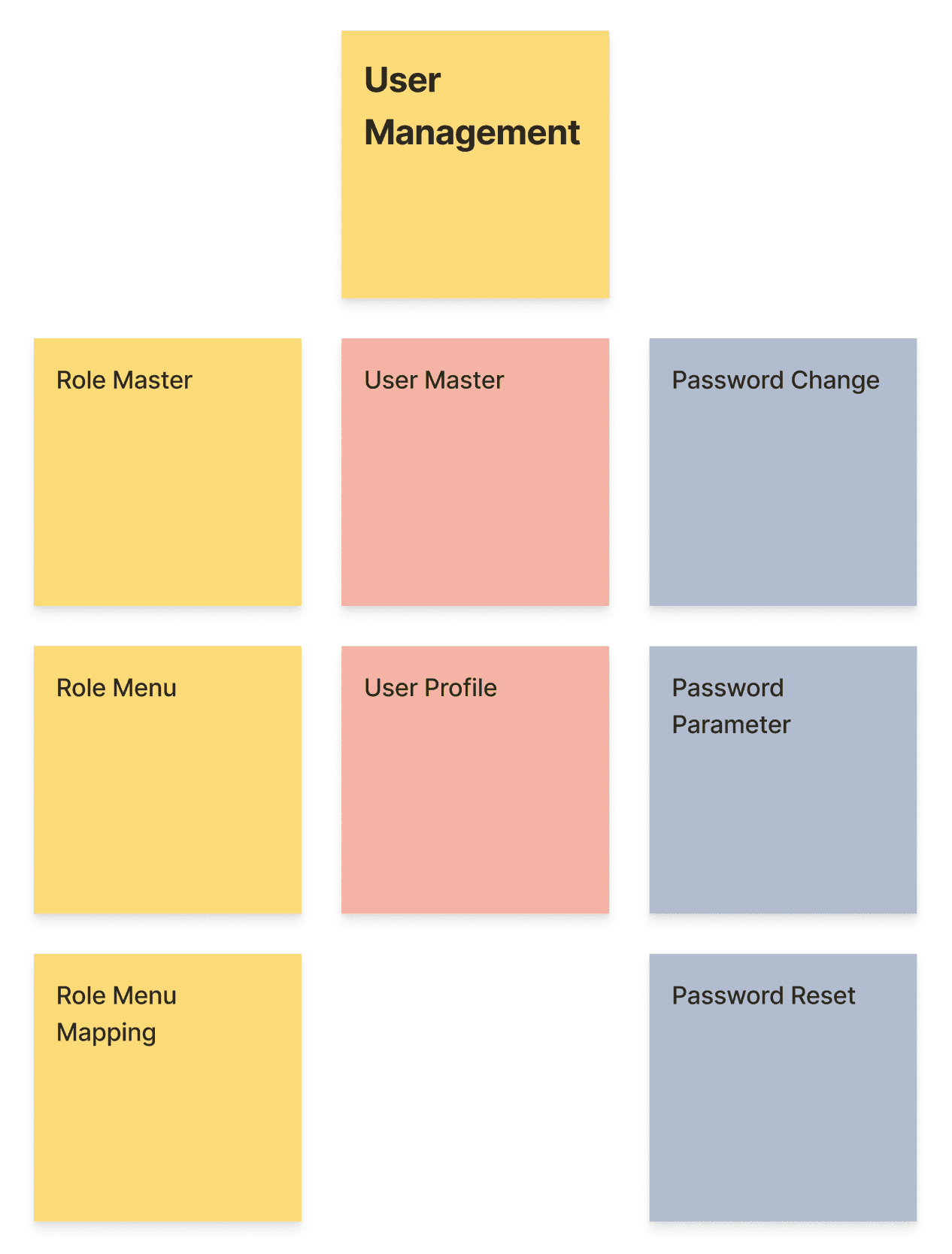
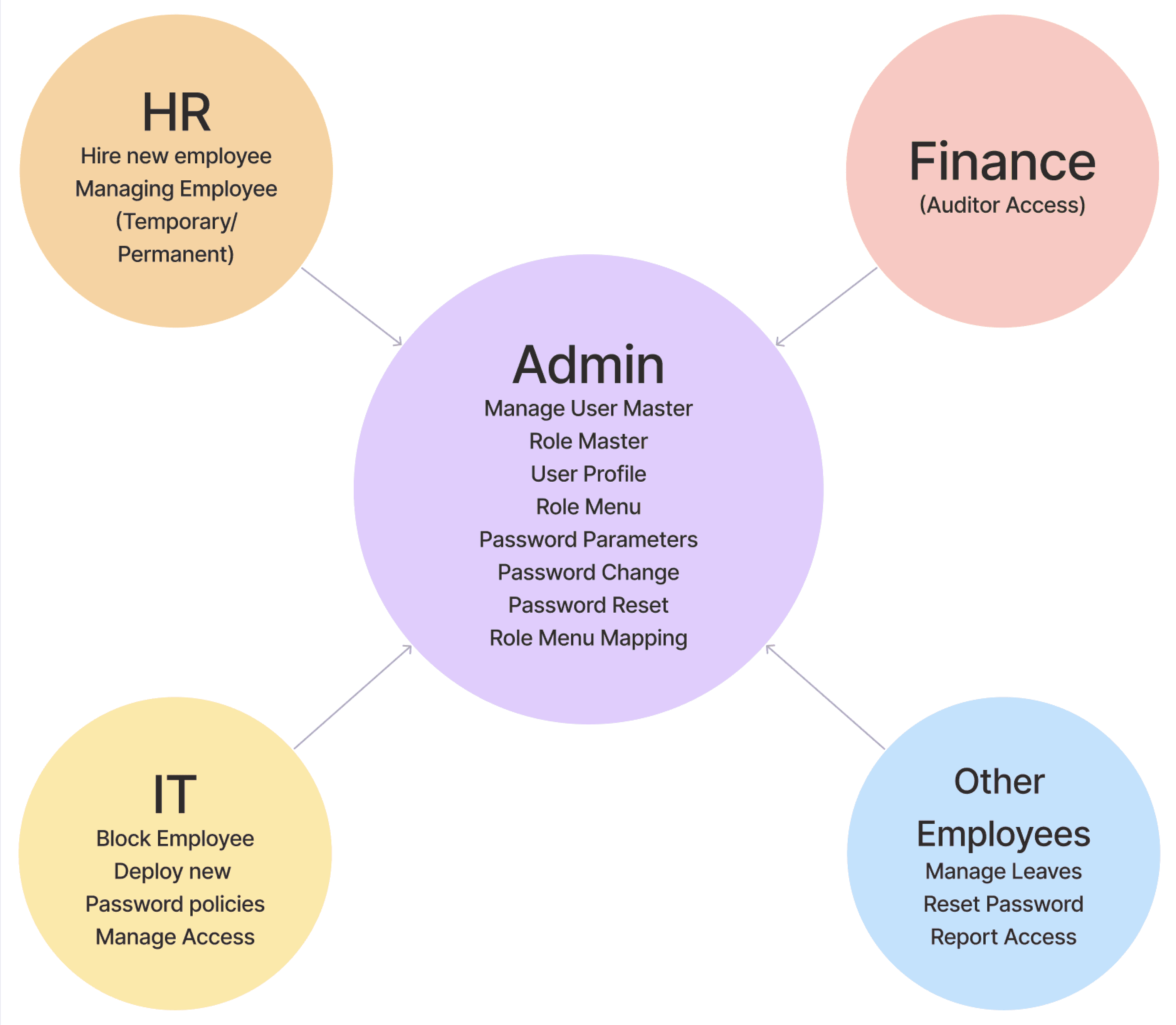
The Role Master allows admins to add roles by application and map menu and access across screens

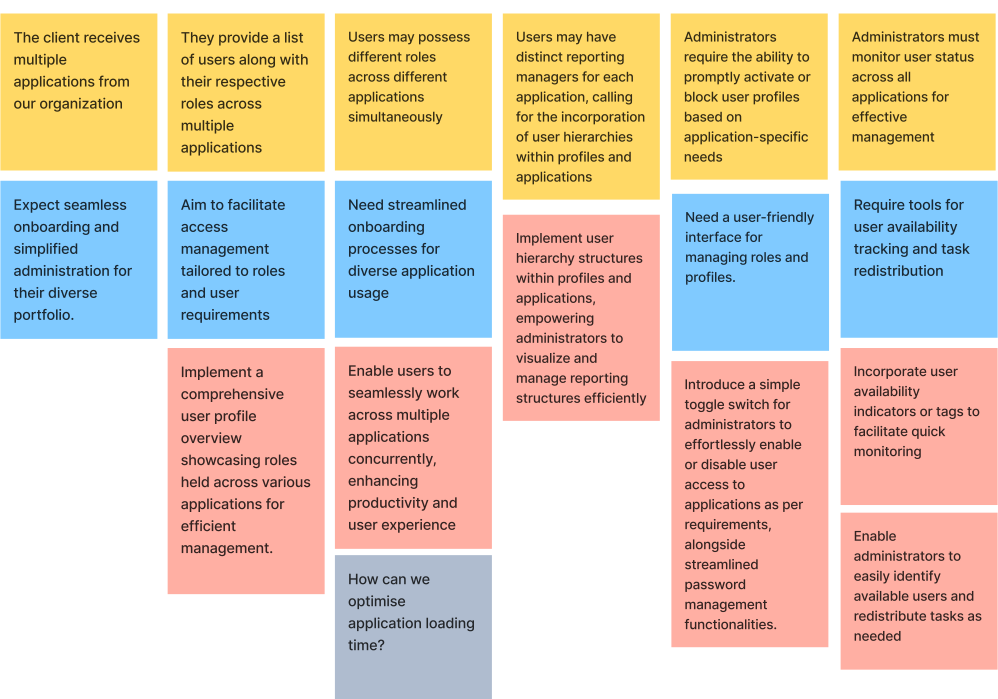
The User Profile feature lets admins add users per application, assign roles, view availability, and manage passwords. It also supports setting up hierarchical structures for varying reporting managers across applications
Admins have the ability to overwrite user profile role menu access as needed.
#Changes Made Recently
Implemented User Management with Role Master and User Profile Screen.
Role Master enables defining roles and mapping menu access per screen.
User Profile allows adding users, mapping roles (multiple roles and products per user), and assigning special role access.
List view feature offers online status check and user blocking.
Upload functionality added for bulk addition of roles and user profiles provided by clients.
Hierarchy check function implemented.
User availability monitoring integrated.
Users can easily adapt to the new role and user profile management.
Adding roles and mapping menu access is straightforward.
Profile management actions are user-friendly.
Managing multiple applications is simplified with universal user management.
#Business Decisions
Assessing if further investments are needed to enhance usability.
Evaluating if the implementation aids the onboarding process.
#Timeline
Implemented from November 22 to March 23.
Users find the system usable and appreciate the overview provided by Role and User Profile.
Admins find it convenient to track user-product associations.
The transition from a linear process to a grid-based one significantly improves user experience.
Mistakes: Difficulty encountered in assigning multiple applications simultaneously on the User Profile page.
So we shared new option in Profile page.

Internally, there's a lack of clarity regarding the implementation of Universal User Management. Action: Align product stakeholders. Engage in discussions with various application stakeholders to identify pain points.
Relying solely on research doesn't offer a clear direction. Establish data tracking to understand users' most frequent actions.
Proposed changes should augment existing features without removing them, ensuring convenience for users.
Research and ideation are necessary to determine whether admins prefer adding users per application or adding users and mapping multiple applications.
Other Projects
One App, All Loans: Simplifying Loan Applications
Identifying and mitigating security threats
Navigating Risk: A UX Journey in Optimizing Daily Banking Operations
Lets meet, I would like to share it in detail